Always memories and write your mobile IMEI numbers in your secret documents, because you may be lost your IMEI (International Mobile Equipment Identity) number in Micromax and other MTK Android mobile phones during the Rooting, Flashing and Updating Rom. It is biggest problem at this time for all Micromax and MTK android devices. So, I try to provide you the solution to overcome from this kind of problem. This fix or resolve lost IMEI Number guide is only for help only those who are suffering this problem.
Before doing this job first you must read government policy, because changing IMEI number is a crime. Have a look….
Note: “Changing your IMEI number is very likely to be a crime in all countries. Please check the law in your country before think about changing your IMEI number.”
The government has already give strict instruction to all telecom operators that they don’t register any mobile which has an incomplete and duplicate IMEI number and even the Commerce and Industries Ministry has imposed a ban on any import of mobile handsets with such a defect.
We have two method to get your lost IMEI Number by follow these methods:
Must Read: How to Backup/Restore of Android phone IMEI No for MTK device
How to fix or resolve lost IMEI Number by Engineering Mode:
Step 1: Open phone dialer then type Engineering Mode code * # * # 3646633 # * # * or *#4634#
Step 2: You will see Engineering Mode on your phone screen. Now move it left side for connectivity tab, You will see CDS information option, tap on it to open. After then tap on Radio information.
Step 3: Tap on Phone 1 for the first SIM IMEI Number. Now you will see AT+ on your phone screen, Top on just after AT+ then you will see a list of commands and choose AT+EGMR=1,7,””. Now type your first IMEI number between inverted commas (“type your IMEI_1”). Note: make a space between AT and +), then after tap on SEND AT COMMAND (See in blow image). If you Single SIM phone, then reboot your phone or device. IF you have double SIM phone then follow Steps 4.
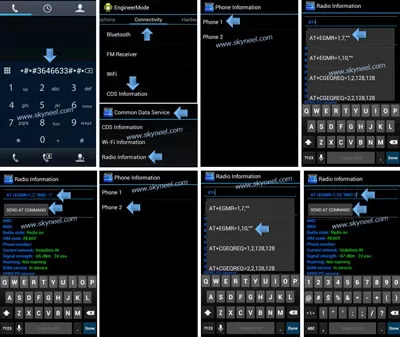
Step 4: For second SIM Tap on Phone 2 (See in above Image). Now you will see AT+ on your phone screen, Top on just after AT+ then you will see a list of commands and choose AT+EGMR=1,10,””(See in above Image). Now type your Second IMEI number between inverted commas (“type your IMEI_2”). Note: make a space between AT and +), then after tap on SEND AT COMMAND. Now reboot your phone or device and check you IMEI number (Dial *#06#).
Must Read : How to fix NVRAM error in all MediaTek devices
How to fix or resolve lost IMEI Number by Mobileuncle tool:
Step 1: Rooted your MTK Android phone. Download and install MobileUncle Tools. Go to Engineer Mode and Select Engineer mode (MTK).
📌 Also Read: How to remove Guest account from Android phone
💡 You might like: Excel: Find Duplicate Values with VLookup in different sheet
Step 2: You will see Engineering Mode on your phone screen. Now move it left side for connectivity tab, You will see CDS information option, tap on it to open. After then tap on Radio information.
Step 3: Tap on Phone 1 for the first SIM IMEI Number. Now you will see AT+ on your phone screen, Top on just after AT+ then you will see a list of commands and choose AT+EGMR=1,7,””. Now type your first IMEI number between inverted commas (“type your IMEI_1”). Note: make a space between AT and +), then after tap on SEND AT COMMAND (See in above Image). If you Single SIM phone, then reboot your phone or device. IF you have double SIM phone then follow Steps 4.
Step 4: For second SIM Tap on Phone 2 (See in above Image). Now you will see AT+ on your phone screen, Top on just after AT+ then you will see a list of commands and choose AT+EGMR=1,10,””(See in above Image). Now type your Second IMEI number between inverted commas (“type your IMEI_2”). Note: make a space between AT and +), then after tap on SEND AT COMMAND. Now reboot your phone or device and check you IMEI number (Dial *#06#).
I hope you like this fix or resolve lost IMEI Number guide from which you will be able to easily fix or resolve lost IMEI Number your Android Smartphone without any extra efforts. If feel any problem in this guide then please use comment box. Thanks to all.
I cant open engineering mode via your given codes and mobile uncle not shows cds option in connectivity of engineering mode ..I have lost connection of sim.. It shows No sim ..emergency call after flash and NVRAM error.
Plz help ..I have root access in my phone
My phone is techno IN5
PLZ HELP
plz help me ..
i have grand prime plus / j2 prime
– i want chang imei but not work any code in dailog
– when enter AT +EGMR=1,7,”IMEI” >>>> get masseg ” AT command is failed to send ” of app MTK Engeneer Mode Plus
– in terminal emulator after reboot devic delet file ” pttycmd1 ”
– in app Chamelephon set IMEI symbol and number EX:4215;9782>::0
plz help me
I am also suffering from this problem
Please help me
Very very thank you. I am very happy it’s working
Hey i tried it but it shows failed to send AT command.please help me
HI i am micromax a104 fire 2
I am using miui custom rom
yesterday morning suddenly both network signal were gone
then i check my imei was gone or deleted automaticallly
now i wanna restore my imei
i tried many process from internet like mobile uncle method,chemelone method, stock rom method,and etc
but still imei not restore or recovered …
Pls help any one
Hi Follow these steps and write your IMEI number.
But how should I get my IMEI no. I don’t have any clue about it. My phone box is lost and noble battery is also inbuilt so what should I do I have use all ideas like chamelephone app and all but it’s not working plz give me the solution
Hey i tried it but it shows failed to send AT command. My phone is Micromax q4310. Please help
micromax phone after flesh imei invalid what ix problem.
THANKS SIR
Awesome work bros… loved it an thanks a lot
Good job bro….
After wasting my 5 hours finally I get it.
Thanks..
what methad u did. can u explain ?
great works …………realy thank ful
THANX BOSS I SOLVED IT ON MICROMAX CANVAS TAB P480 AFTER FLASHING LOLLPOP …
GREATE WORK THANKS A LOT
Thanks buddy , 100% working. :)
Lots of thanks
thank you so much, u saved my life, deleting nvram folder works!!!!!!
thank….its work…
again thanks
It was awsm.
But I have one more problem that after doing this my phone work good for 15-20 days then automatic my both sim stop working and imei invalid comes again. And the WiFi gets on automatic and shows a network name “NVRAM WARNING: Err =0x10. Please help what to do.
Thanks.
Hi Nikhil
I have one solution for it. Flash your stock Rom again then fix IMEI and NV ram issue and set your phone according to you after then take backup via TWRP recovery. and if you face this issue again then restore your backup.
Thanks a lot its working on Micromax a106 (AT+ give one space EGMR=1.7″”
Just follow unite 2 users: AT+ EGMR=1,7,””.
My phone q380 before root access then problem imei invalid
Thanx Boss, its working.
Thnxxxx bro 100% complet
Sir m use Micromax A114 canvas 2.2 kya is ish phone me ham MTK engineering mode App se LTE 4G use kar sakta hun sir ??
Plzzz rply me sir
Thanx…
Thank You BOSS. Great Engineering
Thankx Sir
its working
How do u do this . Plz write down full command
Great. U just saved me 300-500, Rupees
for micromax a120 canvas2 colours , dial ” *#*#84666364#*#*”
Above code doesn’t work in my phone “micromax nitro a310. I have install custom rom cm 13 in my phone. My phone show wrong imei no. And one port not detected sim card ….pls help.
Hi Ritesh you can use Mobile uncle.
THANKS ITS WORKING………..
Hi
In my micromax bolt D303, above code is not opening engineering mode… plz help
Hi Arvind
You can also use MobileUncle tools.
change success without root. used mobile uncle app since engg mode codes did not work
Hi
Here is latest MobileUncle Tools
Merci
what to do if the AT command is failed to send dialog appears in micromax canvas 4 a210
Thanks a lot! Abhishek Sharma to your very helpful tutorial , because it really works on my device . For how long time , I could
now create calls and text after I recover my IMEI.
Thanks a lot Abhishek Sharma for this… For how long time,And now I recovered my IMEI..
Hi sir
i have oppo F1f mobile its not register at any network. i am checked the imei number it shown same imei number are both sim.And then i have checked online imei checker it shown invalid imei.what can i do please give me the solution
Hi
Go to service center, they will resolve this issue.
when I write the software from the service center. then after dialling *#06# a popup window is coming saying “INVALID IMEI”.
but one thing to say I never have taken any backup of IMEI .and I need to restore it . what to do .plz help
Hi Rahul
Follow these steps
thanks bro
Sir,
My phone is Gionee E7 mini,
after flashing Stock ROM — IMEI Invalid
1. Tried Your trick but it says “AT command is failed to send”
2. Tried deleting NVRAM folder of 3.2MB but it comes back with size of ***KB and again it says “AT command is failed to send”
Help me out of this trouble please
Hi Nitin
is your phone rooted?
Abhishek Yes It is rooted
I have also stuck how to fix imei invalid problem on mmx q380 I have tried all this steps not working still saying command error.
bro same here did you find the solution
hi rohith my phone is q 380 iwas have same problum , than i did *#4634# its go to imei writ methad u put imei number there. And reboot mobile than its working fine
Thanks sir, your code is worked on micromax 102
Thanks Bro. I followed ur instruction and able to enter the IMEI no on my Micromax A104
how to solve my imei for a102 micromax canvace doodle 3
Hi Anil
Try this method and solve your IMEI on Micromax A102 Canvace Doodle 3.
mobile uncle tool not entering into engineering mode i flashed flyme 5 in my micromax a102 no solution obtained still now for imei problem .I had no back up please solve my issue thanks in advance
Thanks its working
Thanks friend
really appreciate your code is working on Micromax
thank you very much … for all your detailed steps.
it is really very good effort….
only one imei is fixed but not for second it is still invald
thank you very much,,, this helped me,,,,, i ve jst got scared that what hppned to ma mble,,,, ohh thanks again
Brother pls help me iam in some problem, pls mail to me my mail id is dharmaputra222@gmail.com
bro i have uninstalled my android system keyboard and i want to restore it but all of sudden my phone flip cover closed my phone.. Then i tried to type my pin but i have uninstalled my keyboard now my phone is locked i dont understand how to open it.. Pls help how to unlock my pin.. Sorry for my english…waiting for ur reply pls bro…
Hi Navin
Please tell me your phone brand and model number.
2nd code worked
Hi brother u are super awesome , i have dowloaded a 102 firmware and downloaded to my phone then i lost both imei numbers then again i search the solution found code here then i writen imei numbers its worked. Thank u so much…
thanks problam solve but root folder not locate
Thank you man..
After flashing STOCK OS for my mobile, SIM cards are not working bcause of invalid IMEI problem.
I have tried using many tools and finally got the simple solution from you. Both the options are working well and good.
My mobile : Micromax A190 , Dual SIM
Thank you. .. Thanks lot.
Thanks friend
Ii really appreciate your code is working *#4634#….
code is not running on micromax a106
Thanks…bosss
thanks….code works on micromax q332 mtk 6580
Please help my micromax q332 I have put AT +egrm=1,7″ ” BT it said Error …please help me watsapp 7085241393
You saved me. Thank you!
Bro thank you very much thank you very much this really works bro it is like a great thing i have did today .
i tried this trick before but the thing is that it did from another site but this time i tried your trick .its awesome bro thanks for this post
BELIVE ME BRO I WILL TRY TO PROMOTE YOUR SITE .
just because of this lovely post
Hi Rvee
Welcome and Thanks.
Hie Abhishek
Dude Its not Working On Micromax A106
Kindly Help Me Waiting For Your Reply
Hi Sager
This guide is working on Micromax A106, because it has Mediatek MT6582 chipset.
THANK YOU FRIEND.. AFTER 2 HOURS OF TRYING ALL KINDA PROGRAMS, YOUR METHOD REALLY WORKED. THANK YOU AGAIN !
Thanks Thanks Thanks Friends *#4634# is FinallY Work on Intex Aqua
Speed/
This Method is Permanent or Not
O GOD THAKS FOR EVERTHINGS
thanx *#4634# code good work
Many Many thanks.
Many many thanks for posting How to resolve lost IMEI Number by Engineering Mode.
It is really very helpful and successfu
Hi Abhishek sir
i have follow your commands as given above the same problem was created that coomand was not sent
then i have rooted my phone but i dont know where is the root folder .So please help me where are the root folder and data folder, and how to reach to NVRAM .
Hi Rushikesh
install and open root explorer app, then you can find root folder.
Thank you vry much sir, First method works……
Hi sir
My phone is rooted
Brand : cherry mobile cosmos x2
I’ve followed your step .
Also your instruction for rooted phone
What can I do sir it still saying AT command is failed
Plss help me sir
Hi eldrin
please read comments on this post, you will get solution.
plz anybody help me bro. i tried every method so are any one freind plz suggest me
Bro, please find a way for my A092, i tried a lot of ways to put imei, but can’t got success.
Hello Bro,
Whenever i am trying to use the code, nothing happens, nothing comes, no options seens on the screen. :( My phone is Micromax A092.
Please tell me how i put IMEI on my no., Both IMEI No. was cleared while flashing.
Hi Gaurav
It will not work on Qualcomm MSM8212 Snapdragon 200 chipset.
In my rooted mmx a190 …cds information is thr but click optn is not coming on it..any othr solutn for invalid imei
Hi
Root your phone then go to root folder and open data folder then after delete nvram folder and reboot your phone. then follow this guide.
Sir plz help me my micromax d303 is showing invalid imei no. Plz help me
THANK YOU VERY MUCH YOU ARE GREAT :) !!!!
thanks its working
Thank UUUUUUUUUUU………………
hlw sir, my micromax a064 shows invalid imei no, baseband no,. from engineering mode it says at command failed to send . I give space in at + . but not working. help me
Hi
Root your phone then go to root folder and open data folder then after delete nvram folder and reboot your phone. then follow this guide.
Cannot find anything in the root folder!!
Pls help
Having the same problem as above!!
Ok so you need to use root explorer, go to data folder in the root directory, and delete NVRAM. Or you can just search it.
Many Many thanks.
Many many thanks for posting How to resolve lost IMEI Number by Engineering Mode.
It is really very helpful and successful.
Hey bro I lost my IMEI no so when I send to command then there is showing sending command is failed..plz help me .how can I solve it.?
Hi
Try to send with space and without space command in between AT and +
thumps up thanks
hi inder,
thanks for your compliments you can share this article and like facebook page
Hi sir
i am also suffering from same problem
i have canvas 4 and i lost my imei after flash and i tried all of your tricks at + ..
.., space , nvrm, but still it is showing same ( send comma nd failed) so please solve my issue
Hi
Root your phone then go to root folder and open data folder then after delete nvram folder and reboot your phone. After reboot, follow this method to fix NVRAM error.
sir,
thank u so much for i could start calling on my new tabby family tablet of micromax. other wise for a week i was receiving invalid MMI code.
thanking u again.
nagaland
thanks alot abhishek. going through your blogs was the only way i recovered my micromax a110. from the stock rom guide right up to getting back my lost imei number. you’re doin a great job helping the stranded… keep it up and all the best!!!
Frnds…
example: AT+EGMR=1,7,””
now write your imei
AT+EGMR=1,7,”123456789012345″
(OR)
AT +EGMR=1,7,”123456789012345”
Definitely this methode success……….
I lost my imei no while flashing cwm on my phone(micromaxA177)
I deleted it for the second time.
Now when i follow the above steps it says ‘AT command failed to send’
What should i do
Hi
Root your phone then go to root folder and open data folder then after delete nvram folder and reboot your phone. After reboot, follow this method to fix NVRAM error. And Try to send with space and without space command in between AT and +
I had this problem on tecno7c but after deleting nvram, it works perfectly. Thanks
Abhishek ji, I did followed your video and tried both steps using space between at & + and without using space between at & +, but getting the same error message that at command failed to send. Can you please help me out? My mobile brand is Micromax Canvas 2 plus (a110q).
Hi
Root your phone then go to root folder and open data folder then after delete nvram folder and reboot your phone. After reboot, follow this method to fix NVRAM error.
hey
i jst did everythng u told i gave space between at and +
and even aftr removing that space………aftr clckng on send at command it is not responding nthng happns to it plz suggest what to do
Hi Prabhake
Watch video, it is very simple and I also tried it on A110Q.
I am unable to delete the nvram folder
Hi
Root your phone then delete the nvram folder.
hiii…rocco nash…how did you solve this problem in micromax a110q….because i have the same problem in my a110q android mobile..please help me bro..
Thanks its working
i recover my lost device
I have canvas 4 rooted with miui rom. I have tried everything even space between at + still it says at command failed.
Mobile uncle also I tried but no use.
Find a solution plz Abhishek.
Hi
Flash your Stock Rom then try this method.
Hello Abhishake
I lost my imei no. Got idea how to fix it but i dont knw imei number nether in have box or invoice copy its canvas juice A77 pls help how could i get it done …
Hi
Read this guide and find your IMEI number : How to get lost Smartphone IMEI Number by Google
its working in canvas HD a116 :D
Hello! I have a big big problem, because I put my IMEI and when I click on send the message is “AT command is failed to send”. I see on the third row to “Radio state” the message “Radio off” . Please help me to open this signal or what is this!
Hi Cipylan
Try to send with space and without space command in between AT and +
please help me resolve it i use micromax unite3 Q372 i get invalid imei
Hi Jubelee
Try to make space between AT and + then send
Hi
I just checked Your Post
i am Using Yureka
Will this work for yureka ??
and if yes
then do i need to root my phone first to carry out this process ?
thank You !
No, because your phone did not have Engineer MOde app
It works on only mediatek based processor mobiles only
hello Kasisathy,
Yes, It works on Mtk based devices
do we need rooting for the first process? bcoz when i am typing the code engineering mode is not coming..
No need to root your phone for Engineer Mode
Hi bro
Its worked on my micromax A114.
but when restore to factory settings again the same is coming and i have do to do the same process again to get network
I need solution for that please help me….
yes this is a big problem after lost IMEI number
sir i have same problem not send at command failed
Hi
Make space between AT and +
Hi Abhishek
I rooted My micromax a110 phone and update jelly bean from ICS now imei invalid. I'm using S.E.M.I version jelly bean. I try above scree shot method but when I click Phone 1 its saying unfourtunately stopped working and exit form the page that showing Phone 1 & 2.
How to resolve this ? Please help me. (gshogan@gmail.com)
Shankar
Hello sir i must enter old imei or i just do a new imei…can u solve my problem
Hi
enter only your phone IMEI number
Sir I followed ur metheod with mobile uncle my phone was rooted and I retrived my imei no but the network from the network provider is still not coming
Hi Nilansh
Switch of your for for few min the start
sir micromax A110q canvas 2plus
Prachi this is perfectly work on your phone, try to make space between AT and + or remove space between AT and +. Try both command.
kya karna padyega iske liye sir
sir mobile main…at commnad send to fail dikha raha hai
nothing special
watch my video. In this video i am describe all steps with space between AT and +. Now you are just try without making space between AT and +. and you will this command: AT+EGMR=1,7,"type your First IMEI Number in these commas"
and tap on send at command button.
k
again facing same problem
Prachi can you send me screen short of your phone via google hangout
sir i have lost my imei no. to rooting the device…i have also follow ur video…but it doesnt work,,what i do
Hi Prachi
which is your phone brand and model no.?
by the way, lenovo a328 kitkat 4.4.2
Hi
root your phone then try to use mobile uncle tool
My phonw ia rooted, but it says "this command is not allowed in user build" and if i put a space in between. It says at commandfailed.
In engineering Mode not need root but Mobile uncle tool required root, So try Mobile uncle tool.
not allowed in user build..
if i put a space, at command is failed.
how to do? any reply would be great
Try this code to fix imei: *#4634#
thanks a bunch your code works on micromax atleast!
love bro thnx